Active installs
10K+
Subscription includes
Support
Product CSV Import Suite lets you import thousands of products and supports complex products and custom data from Product Vendors, Brands, Google Product Feed and more.
The bread and butter of WooCommerce is allowing you to sell anything. It can be time consuming updating products (for example, adjusting prices), especially if you have a lot of products or many changes.
Save yourself the hassle of making changes one-by-one with Product CSV Import Suite.
Create, upload or update thousands of products at once, including complex products. Mass update standard items like price and description, along with custom data like appointment availability, resources and more.
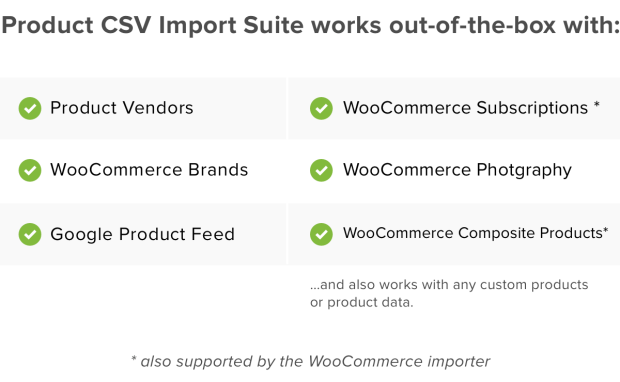
Product CSV Import Suite goes beyond the basic import / export tool available in WooCommerce to support more extensions, including Product Vendors, WooCommerce Photography and Google Product Feed.
Beyond special kinds of products, you might have special information you want to import and update, for example:
Product CSV Import Suite captures custom field information, without requiring custom code, so you can include extra information in your imports and exports. Beyond this – you can import information into any custom taxonomies, so you can add or update all the data about your products.
You can use Product CSV Import to export data back to a CSV file.
On top of products in published or private mode, you can also export products set to draft.
If your store has a lot of products, you may run into challenges exporting all of them at once. With Product CSV Import Suite, set a limit on how many you’d like to export, or skip exporting the first X rows of products, to make your exports more manageable.
If you merge products and variations in your store, you can export these changes back to your CSV file, too.
And if you’re looking to export customer or order data, try WooCommerce Customer / Order CSV Export.
Yes. Product CSV Import Suite is a WooCommerce import and export extension built for bulk work, so you can create and upload hundreds or thousands of products from a single CSV file. It is a strong fit for stores that are migrating a catalog, launching with a large inventory, or adding many products at once, rather than entering each item by hand.
Yes. Product CSV Import Suite lets you merge changes into products you already have, so you can mass update standard details like price and description across your catalog in one go. It matches rows to existing products using a product ID or SKU column, which is helpful when you need to adjust pricing, prepare a sale, or refresh product data without opening each product individually.
Yes. Product CSV Import Suite supports variable products and their variations. Variations are handled through a separate variations CSV, which gives you clear control over parent products and the individual variations attached to them. This is useful for stores selling items in multiple options such as size or color.
Yes. Product CSV Import Suite goes beyond the basic import and export tool built into WooCommerce to support more extensions and custom product data. It has been tested to work with extensions including Product Vendors, WooCommerce Brands, WooCommerce Photography, and Google Product Feed. That means you can do things like assign products to the vendor that sells them or add the brand that makes them, all as part of your import.
Yes. Product CSV Import Suite captures custom field information without requiring custom code, so you can include extra details in your imports and exports. You can also import information into any custom taxonomies, which lets you add or update the full set of data about your products from one file. This is helpful for stores that rely on custom product information beyond the standard WooCommerce fields.
Yes. Product CSV Import Suite can export your product data back to a CSV file. Alongside published and private products, it can also export products set to draft, and if you have merged products and variations, you can export those changes too. This makes it useful for backups, bulk edits in a spreadsheet, and moving product data between stores.
Yes. If your store has many products, exporting them all at once can be a challenge, so Product CSV Import Suite lets you set a limit on how many products to export or skip a set number of rows using an offset. This gives you more manageable, targeted exports instead of one large file.
Yes. Because you can export your product data to a CSV and then import or merge it elsewhere, Product CSV Import Suite can help you move and sync catalog data between stores. Rows are matched to existing products by ID or SKU during a merge, so you can keep product details aligned across sites.
WooCommerce includes a built-in product import and export tool that works well for simple, variable, and subscription products, as well as Product Bundles and Composite Products. Product CSV Import Suite is the premium option for stores that need more, including support for additional extensions like Product Vendors, WooCommerce Photography, and Google Product Feed, plus custom fields and custom taxonomy data. If your needs go beyond standard product types, the Suite is designed to cover them.
Product CSV Import Suite is best for stores with large catalogs, complex products, or custom product data from supported extensions such as Product Vendors and WooCommerce Brands. It is a good fit if you regularly create or update many products at once, or if you need to include custom fields and custom taxonomy data that the basic importer does not cover.
If you are only working with simple, variable, or subscription products, or with Product Bundles or Composite Products, the import and export tool built into WooCommerce may be all you need. Product CSV Import Suite is aimed at stores that need to go further, such as importing custom data or data tied to supported extensions. Start with the built-in tool for straightforward catalogs, and move to the Suite when your product data becomes more complex.
Not for that job. Product CSV Import Suite is focused on products and variations. If you need to export customer or order data, WooCommerce Customer / Order CSV Export is the extension designed for that purpose.
Yes. When the extension is active, it adds Delete ALL Products and Delete ALL Variations tools under WooCommerce > Status > Tools. These are useful for clearing out a catalog before a fresh import, but they are irreversible, so it is worth backing up your store or testing on a staging site before using them.
Extension information
Quality Checks
Countries